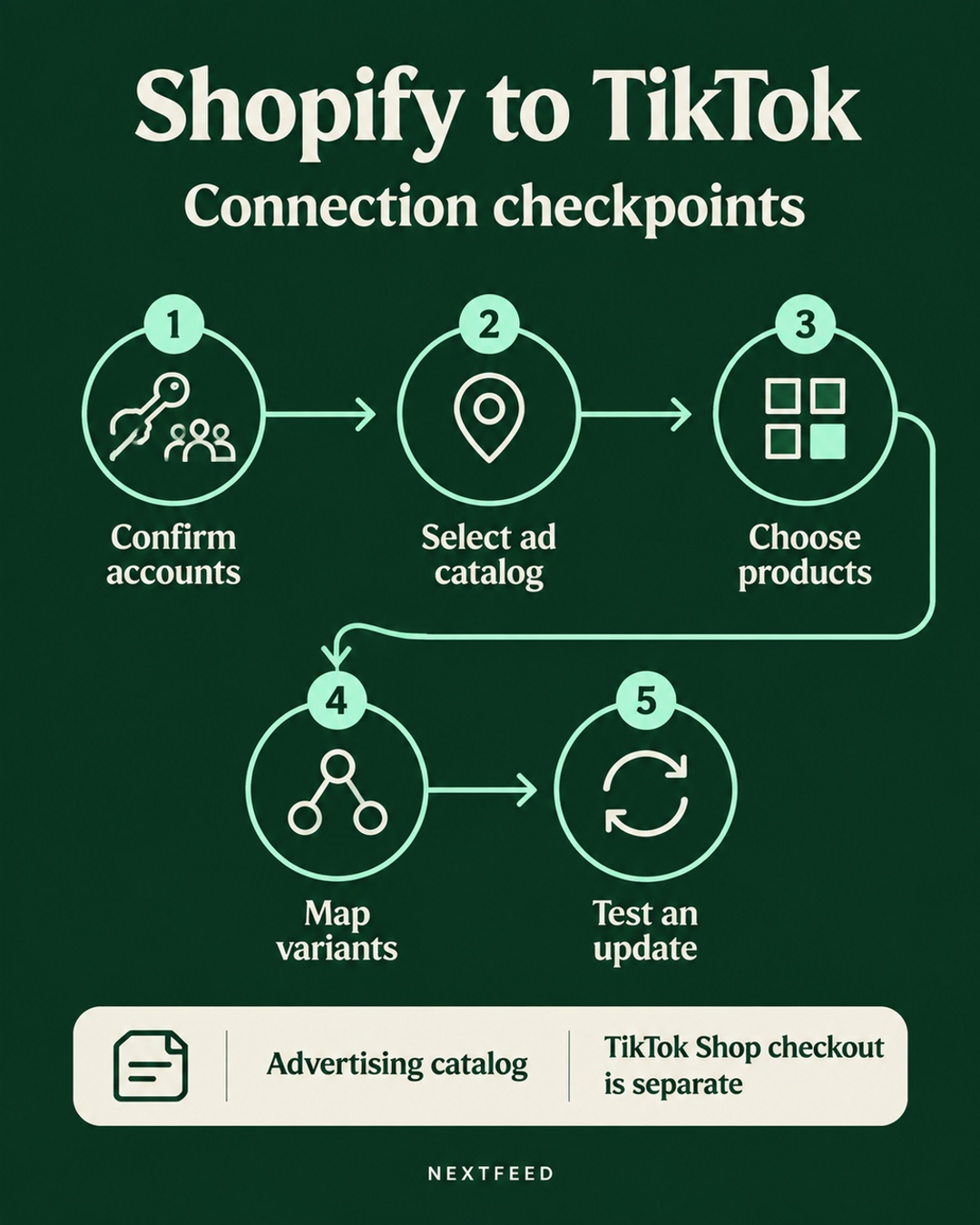
Connecting Shopify to TikTok is easy to describe as a single sync. In practice, the useful test starts after products appear. You need to verify account ownership, the catalog destination, product selection, variant mapping, and the first change coming from Shopify.
There is also a terminology trap. TikTok advertising catalogs and TikTok Shop seller onboarding are related to commerce, but they are not the same workflow. TikTok's catalog product parameters reference describes advertising catalogs in supported markets and accounts. It does not serve as a general TikTok Shop seller onboarding guide.
Start with the accounts and destination
Before reviewing product fields, identify the assets involved. Confirm the Shopify store, TikTok Business Center, advertising account, and catalog belong to the intended business setup. A connection can look successful while pointing to the wrong business or catalog.
Do not rely only on a connector's familiar screen sequence. Native Shopify channels and installed connectors change over time, and capabilities vary by destination and account. Read the selected catalog name, business account, and advertising destination from the current interface. Record them in the setup notes.
This step also helps separate two decisions. One decision is where product data is sent for advertising. Another is whether a merchant has completed TikTok Shop seller onboarding and can sell through Shop features. A catalog import does not establish Shop seller approval, product eligibility, or selling permissions.
Confirm which products the connector sends
Product selection is often broader or narrower than expected. The source may include all products, a collection, or a selected product set. Compare the connector's selection with the products you expect in the TikTok catalog.
Check one included product, one excluded product, and one recently added product. This small sample can reveal whether the source scope matches the business rule. If a product is missing, inspect selection filters before changing product fields.
Review the installed connector before purchasing a separate feed tool. Some native channel setups can support product selections, optimized titles and descriptions, and error diagnostics. That does not mean every account has the same options. Evaluate the actual destination and connector configuration first.
Review the advertising catalog fields
TikTok lists these required advertising catalog parameters: sku_id, title, description, availability, condition, price, link, image_link, and brand. The sku_id should remain stable when the same item is updated. Changing that identifier can make an update look like a new item.
Keep promotional text out of the title. Check that prices and stock match the landing page. Product links and image links must be accessible to the destination. TikTok's availability examples use values with spaces, such as in stock and out of stock. Do not copy enum formats from another platform without checking the TikTok specification.
For variants, inspect the parent and each child item. An optional item_group_id can group variants in an advertising catalog. Confirm that the size or color option, price, availability, and image belong to the same variant rather than to the parent product or a neighboring option.
Use the first source change as a control test
An initial import only shows that some data crossed the connection. A source change tests whether the connection can keep product data current.
- Choose one low-risk test product.
- Record its current price, availability, image, and variant details in Shopify.
- Change one value, such as the price or stock state.
- Note the time and the exact source value.
- Inspect the first corresponding update in TikTok.
Keep the example controlled. For instance, imagine a hypothetical store with a blue medium hoodie. Shopify lists SKU H-204-M, the item is in stock, and the price is 48. The operator changes the Shopify price to 44. After the connector's first update, they compare the TikTok catalog item, the linked landing page, and the selected variant. If the catalog still shows 48, the operator investigates sync status and mapping instead of editing TikTok manually.
This test does not prove every product will update correctly. It gives you a traceable first change and a starting point for checking the connector's behavior.
Separate validation from eligibility
A product can pass a data validation check and still face separate policy, account, market, or destination requirements. Conversely, a product can fail because a required field is missing or formatted incorrectly. Treat the status message as a diagnostic clue, not as proof of approval, delivery, or performance.
For an advertising catalog, check the required fields, accessible links, image retrieval, title content, price, stock, and variant relationships. For TikTok Shop onboarding, follow the separate seller and commerce requirements shown in the relevant account workflow. Do not use an advertising catalog document to claim that Shop onboarding is complete.
Google's product data guidance is useful as a comparison point because it also stresses accurate price and availability, genuine identifiers, variant data, and product images. The schemas and policies are not interchangeable. A product that passes one destination's checks may need different treatment elsewhere.
A practical review table
| Checkpoint | What to inspect | Useful evidence |
|---|---|---|
| Ownership | Store, Business Center, ad account | Selected account names |
| Destination | Catalog and advertising destination | Catalog settings record |
| Selection | Collections or product sets | Included and excluded samples |
| Variants | SKU, options, images, prices, stock | Parent and child comparison |
| First change | One Shopify update | Source and received values |
What to do when the first change fails
Start with the narrowest explanation. Confirm the selected product is in scope. Check that the source value actually changed in Shopify. Review the connector's diagnostics and the TikTok catalog status. Then inspect the destination and variant mapping.
A missing update does not automatically mean a paid tool is required. The installed connector may already expose the relevant error or selection setting. If it does not, document the exact product, source value, destination, and status before escalating to platform or connector support.
Do not patch the catalog by manually changing the same field in TikTok while Shopify remains the source. That creates two competing values and makes the next diagnosis harder. Fix the source or mapping, then observe the next update.
Frequently asked questions
Does a TikTok advertising catalog connection complete TikTok Shop onboarding?
No. The catalog parameter reference describes advertising catalogs. TikTok Shop seller onboarding and related account or commerce eligibility checks are separate workflows.
What should remain stable when a product is updated?
Keep the item's sku_id stable for updates. Review variant grouping, prices, availability, links, and images after the change.
Do I need a paid feed tool for Shopify to TikTok?
Not automatically. First inspect the installed connector for product selection, optimized content, and diagnostics. Capabilities vary by destination and account, so decide after reviewing the actual setup.