Free Product Feed Validator: Catch Catalog Issues Before Distribution
What if a feed looks complete but still contains errors that disrupt distribution? A free product feed validator can surface formatting issues, data errors, and catalog inconsistencies before they reach an external channel. A clean result, however, doesn’t mean every product meets every channel’s requirements.
Validation is useful when you need a quick check without adding more manual work. Its value depends on what it checks and how you interpret the findings. Feed structure, product data quality, and channel-specific requirements are related, but they are separate checks.
This guide explains what a validator can detect, how to assess its results, and how to prioritize corrections before distribution. You’ll learn when a free check is useful, when a destination’s requirements call for closer review, and when ongoing feed management can help organize and prepare catalog data across multiple selling channels.
Key Takeaways
-
A free product feed validator can flag formatting issues, data errors, and catalog inconsistencies, but its results don’t guarantee readiness for every sales channel.
-
Separate feed structure problems from product data issues and channel-specific requirements to understand what a finding means.
-
Use validation findings to locate affected products, correct the source data, and check the updated feed before distribution.
-
Prioritize issues that could affect product identification, accuracy, or distribution readiness before lower-impact refinements.
-
When catalog work spans multiple channels, consider whether ongoing feed organization and management would support updates better than isolated checks.
Table of Contents
-
What a Free Product Feed Validator Checks, and What It Cannot Guarantee
-
How a Free Product Feed Validator Finds Catalog Data Problems
-
Free Product Feed Validator vs. Channel Checker vs. Feed Management Platform
-
Move from a Free Feed Check to Ongoing Catalog Control with NextFeed
What a Free Product Feed Validator Checks, and What It Cannot Guarantee
A product feed carries structured catalog information, such as product identifiers, titles, prices, availability, and links, to external services. A product feed validator inspects that data and flags issues within the checks it performs. NextFeed’s Free Feed Validator helps merchants identify data errors, formatting issues, and catalog inconsistencies before sending feed data to external channels.
A validation result has limits. It can show that a particular issue was detected or that the feed passed the checks performed. It can’t guarantee that every channel will approve the catalog, that every product detail is accurate, or that the data will remain correct after the check.
Feed syntax, product data, and channel rules are different checks
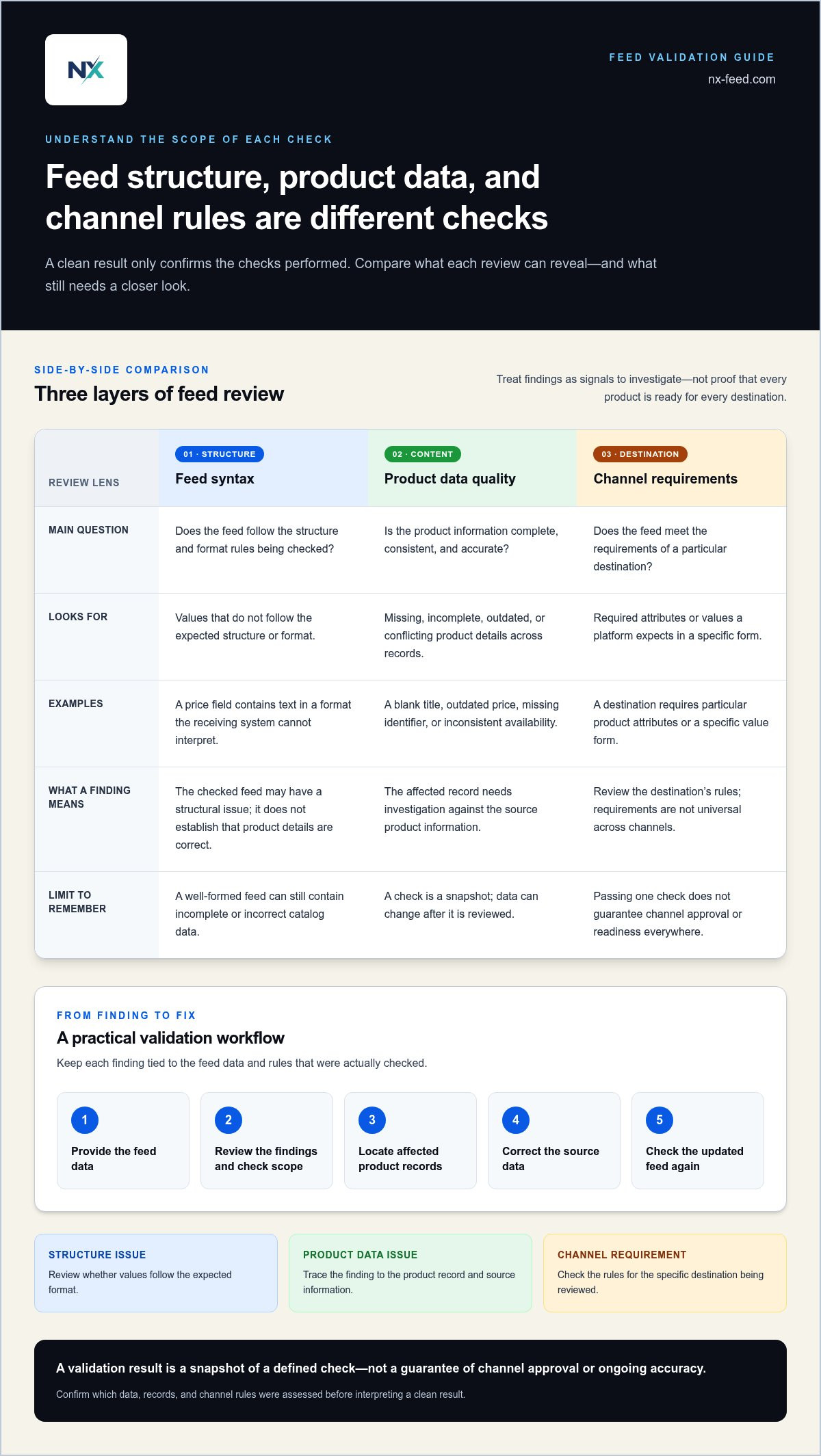
Syntax validation checks whether information follows a format’s structural rules. For example, an Atom or RSS validator can check whether a feed follows the relevant format. That is different from checking whether the product information is complete or correct.
A feed can be well-formed and still contain a blank title, an outdated price, or inconsistent availability across related product records. These are data-quality issues: the structure may be acceptable, but the catalog content needs review.
Channel requirements add another layer. A platform may require particular attributes or expect values in a specific form. Those rules aren’t universal, and a general syntax check won’t establish that a feed meets every channel’s specifications. Interpret a validator’s findings in light of what it checks.
What a validation result can, and cannot, tell you
Use findings as signals for investigation, not proof of approval. A formatting warning can point to a structural issue; a catalog inconsistency can direct attention to affected product records. Trace each finding to its source and determine whether the underlying product data needs correction.
Some problems are detectable in the feed at the time it’s checked. Others can arise later as product information changes or channel requirements are updated. A clean result is a snapshot, not an ongoing assessment of accuracy or channel acceptance.
Validation checks feed data for detectable issues within a defined scope. It helps guide review and correction, but doesn’t guarantee channel approval or ongoing accuracy.
For a practical review, first classify each finding as a structure issue, product-level content issue, or channel-specific requirement. Then check the relevant records and source information before distribution. This helps teams avoid treating every warning as the same problem or assuming that passing one check means the catalog is ready everywhere.
How a Free Product Feed Validator Finds Catalog Data Problems
A validation pass turns a large catalog into a set of issues to investigate. The workflow is straightforward: provide feed data to a validator, review its findings, locate the affected records, correct the source data, and check again. The tool’s input method and results can differ, so focus on the findings and the scope of the check.
NextFeed’s Free Feed Validator helps merchants identify product feed data errors, formatting issues, and catalog inconsistencies before external distribution. Its findings are a starting point for troubleshooting, not a substitute for confirming what the product information should say.
Validating before distribution can surface feed problems while there’s still time to trace them to their source and correct the catalog.
Which product feed issues should teams look for?
Formatting problems occur when a value doesn’t follow the expected structure. For example, a price field might contain text in a format the receiving system can’t interpret. The value is present, but its structure may prevent it from being used as intended.
Catalog inconsistencies include product information that is missing, incomplete, or conflicting across records. A product might lack an identifier, or related records might show different availability. These are examples to investigate, not a guarantee that every validator checks for each condition.
Why validation scope matters before distribution
A validator can assess only the feed data and rules within its scope. A general check can help identify formatting or catalog issues, while a channel-specific review considers the requirements of a particular destination. Don’t treat one result as proof that every product or channel has been checked.
Before acting on a result, note what the tool assessed: the data submitted, the records covered, and whether channel-specific rules were included. If only part of a catalog was examined, the findings don’t establish the condition of the rest.
Trace each issue to its source. If a finding points to a malformed or incomplete value, inspect the product record and correct the underlying catalog data rather than relying on a temporary adjustment to a downstream copy. Then check the updated feed within the same scope to see whether the issue remains.
This also helps separate a data correction from a channel-specific decision. A missing value may need to be added at the source; a channel rule may require a separate review of destination requirements. Understanding the scope prevents a clean general check from being mistaken for full distribution readiness.
For a first pass before distribution, use the NextFeed Free Feed Validator to identify feed errors and catalog inconsistencies, then investigate and correct the source data.
Free Product Feed Validator vs. Channel Checker vs. Feed Management Platform
These tools address different parts of catalog operations. A free product feed validator helps diagnose a feed. A channel checker assesses data against a destination’s requirements. A feed management platform supports the broader work of organizing and preparing catalog feeds across channels. Understanding the differences helps you choose the right next step rather than expecting one check to do every job.
| Tool type | Purpose and typical scope | What happens after findings |
|---|---|---|
| General syntax validator | Checks whether a feed follows the structure of a particular format. Its scope may not include product quality or channel rules. | Teams investigate formatting findings and correct the feed or source data. |
| Channel checker | Reviews product data against requirements for a specific destination. The checks depend on that tool and channel. | Teams review flagged attributes or requirements, then prepare the feed for that destination. |
| Feed management platform | Supports ongoing organization, optimization, and management of feeds for multiple selling channels. | Teams use an organized workflow to prepare and manage catalog feeds across channels. |
When is a free validator enough for the task?
A one-time check is useful when reviewing a feed before distribution or investigating a specific problem. NextFeed’s Free Feed Validator identifies data errors, formatting issues, and catalog inconsistencies for teams to review. You still need to interpret the findings, correct source information, and review destination-specific requirements.
Use a focused check when your immediate question is whether the feed contains detectable issues that need attention. After reviewing the results, assign corrections to the people responsible for the catalog and verify the source data. A passing check is a useful signal within its scope, not a replacement for channel policy review or ongoing catalog upkeep.
When does feed management solve a different problem?
The need changes when teams repeatedly prepare catalog data for multiple selling channels. Each destination adds work to organize and maintain, and recurring source changes can make isolated checks insufficient as the only control. A feed management platform addresses that broader operational need rather than simply reporting findings.
NextFeed’s Product Feed Management Platform helps retailers organize, optimize, and manage catalog feeds across multiple selling channels. Its role differs from the validator’s diagnostic role: validation helps identify issues, while feed management supports the wider preparation and coordination of feeds.
Use the validator for an initial review or focused troubleshooting. Consider broader feed management when channel preparation becomes recurring work and teams need an organized way to manage catalog feeds across destinations. The right choice depends on whether the task is finding a problem or managing a continuing workflow.
How to Turn Product Feed Validation Results into Action
A finding is useful only when it leads to a correction. For each issue, understand what the result flags, identify the affected product records, correct the responsible source data, and validate the updated feed. This approach focuses on fixing the underlying cause rather than repeatedly patching individual outputs.
-
Review the finding. Determine whether it relates to formatting, missing or inconsistent product information, or a channel-specific requirement.
-
Identify the affected products. Find the records and fields involved, and establish whether the issue is isolated or repeated across the catalog.
-
Correct the source data. Assign the fix to the owner of that catalog field so the correction reaches the appropriate source, not just one exported version.
-
Validate again. Check the revised feed to see whether the original issue remains, and review any new findings within the same scope.
A channel disapproval and a validator finding are not interchangeable. A validator flags issues it can detect within its checks; a channel disapproval comes from the destination’s review. Compare the disapproval with the channel’s explanation, then investigate the relevant product data or requirement. A passing validation result doesn’t resolve a separate policy or channel-specific issue.
Prioritize corrections by impact and reach
Start with issues that could affect product identification, accuracy, or distribution readiness. Then consider reach: how many products and fields are affected, and whether the issue appears across multiple destinations. This gives teams a practical way to weigh severity and volume without relying on a universal score. An issue affecting many records should generally take priority over a cosmetic refinement on a single listing.
Look for patterns before editing records one by one. If multiple products share the same missing or inconsistent value, trace the problem to the source field or catalog process. Assign an owner for recurring fields, document the pattern and its resolution, and use that record to reduce repeat cleanup.
Revalidate after changes and maintain a review cadence
Run another check after material changes to product data or feed structure, especially before distribution. Set the routine according to how often the catalog changes and how the team prepares feeds for its channels. A stable catalog may need a different review rhythm from one with frequent updates. Choose a cadence that reflects your operation rather than treating it as a fixed requirement of a validator.
Keep a simple correction log with the finding, affected field or products, assigned owner, action taken, and recheck outcome. Over time, this helps distinguish recurring source-data problems from one-off errors and shows where catalog controls need attention. A free product feed validation check can help surface issues to investigate before distribution.
Move from a Free Feed Check to Ongoing Catalog Control with NextFeed
A validator and a feed management platform solve related but different problems. The validator surfaces issues in a feed at a particular point in time. A platform supports the broader work of organizing and managing catalog feeds across selling channels. Start with diagnosis, then extend the workflow when preparing and maintaining feeds becomes recurring work.
This distinction matters when a catalog reaches multiple destinations. Product information may need ongoing organization and preparation across channels, while a one-time check focuses on the data examined. Validation supports troubleshooting; feed management supports the wider catalog workflow.
Start with the complimentary NextFeed Feed Validator
NextFeed’s complimentary Feed Validator is a practical diagnostic before external distribution. It helps identify data errors, formatting issues, and catalog inconsistencies so your team can investigate findings and decide what needs correction. Treat the results as a starting point for review, not a guarantee of channel approval or continuing accuracy.
Use the complimentary NextFeed Feed Validator to check a product feed before distribution. Review the findings, trace relevant issues to their source, and correct the underlying catalog data. This can surface problems early enough for your team to act before sending the data onward.
Extend the workflow across selling channels
When catalog preparation repeats across multiple sales channels, isolated checks may not address the full operational need. Teams also need to organize feed data, optimize catalog feeds, and manage preparation across destinations. A broader workflow can make that work more consistent and easier to oversee, particularly when catalog changes need to be reflected in channel feeds.
The NextFeed Product Feed Management Platform helps retailers organize, optimize, and manage catalog feeds across multiple selling channels. Its role goes beyond identifying errors: it supports ongoing feed operations around catalog preparation. The validator diagnoses; the platform supports feed management.
Consider the pattern of work, not just the last error. If you need an initial check or are troubleshooting a feed, use the validator. If your team regularly organizes and prepares catalog feeds for several destinations, consider how a managed feed workflow fits those operations. Match the level of control to your catalog and channel workload.
Use the complimentary validator for an initial check. When the work extends to organizing and managing feeds across channels, the NextFeed Product Feed Management Platform supports that broader workflow.
Make Catalog Quality Part of Your Next Release
Product data quality is easier to maintain when it has clear ownership. Before the next catalog change, align merchandising and channel teams on which system holds the authoritative product information and who is responsible for key fields. A shared reference point helps teams resolve questions consistently as catalog data moves through the business.
A free product feed validator can be a practical starting point for strengthening that process. Make it part of your pre-distribution routine, then decide whether your team needs occasional diagnostic checks or ongoing feed operations across channels.
Clear ownership and a deliberate process help your team prepare catalog data with confidence. Use the validator to check for issues, then choose a workflow that fits the scale and frequency of your catalog operations.
Frequently Asked Questions
What is a free product feed validator?
A free product feed validator is a tool for checking product data for issues before it’s distributed outside your business. It helps teams assess a feed before a destination handles the data. Treat the output as a snapshot of the checks performed. Decide who will review findings and how corrections will be recorded.
What errors can a product feed validator find?
Depending on its scope, a validator may flag formatting problems, data errors, or inconsistencies between product records. For example, product variants might have conflicting information in a field that should align across the catalog. NextFeed’s Free Feed Validator identifies data errors, formatting issues, and catalog inconsistencies. Review each finding in context to determine whether the source record or a later feed-preparation step needs attention.
Does passing a feed validation guarantee Google Merchant Center approval?
No. A passing result means the feed met the checks performed, not that Google Merchant Center will approve every product or the account. If a product is disapproved, use the destination’s diagnostic information to identify the stated reason, then compare it with the product record and channel requirements. Keep that investigation separate from the validator result, and reassess affected items after making changes.
Can a free product feed validator fix errors automatically?
Validation identifies issues; correcting them requires addressing the underlying catalog data. NextFeed’s Free Feed Validator helps check and troubleshoot product feeds. If a product attribute is incorrect, trace it to the system or process that maintains the information, make the correction there, and check the updated feed before relying on it.
How often should I validate my product feed?
Validate when preparing data for distribution and after changes that could affect product records or feed structure. The right schedule depends on how frequently your catalog changes and how often your team prepares feeds. A team with regular product updates may build checks into its release routine, while a more stable catalog may check around planned distribution. Set a cadence that matches actual change volume, then adjust if issues recur.
What should I do after a product feed validator finds an issue?
First identify the affected products and fields, then trace the issue to its source. A problem repeated across multiple records may point to a shared catalog process, while an isolated finding may need a targeted correction. Record the cause, owner, and resolution so the issue is easier to recognize next time. After updating the relevant data, validate again and investigate any destination-specific rejection through that channel’s diagnostics.
Is a free validator enough to manage product feeds across multiple channels?
A validator can help detect issues, but it doesn’t replace the broader work of managing feeds across destinations. If your team repeatedly organizes and prepares catalog data for several selling channels, an ongoing workflow may better fit that workload. NextFeed’s Product Feed Management Platform supports feed organization, optimization, and management across multiple selling channels, while the validator provides a focused way to check and troubleshoot feed data.
Run your product feed through the free NextFeed Validator to identify issues before distribution.