Product Feed Management: From Raw Catalog to Channel-Ready Data
A catalog can be accurate at its source and still produce listings that are incomplete, inconsistent, or rejected by a sales channel. Product feed management creates a controlled path from one catalog to channel-specific outputs, so every update doesn’t turn into a series of manual fixes.
Each channel has its own data requirements, and product details change over time. A one-time file conversion won’t keep listings current as inventory, pricing, and product information shift. A repeatable workflow prepares data for each destination and checks it before distribution.
This article explains the steps from source catalog to channel-ready feed, including how to standardize attributes, apply channel rules, and catch data or formatting issues early. You’ll also learn how to assign ongoing responsibilities and when a management platform or validator can reduce manual effort. NextFeed supports feed preparation across multiple selling channels, and its Free Feed Validator checks feeds for data errors and formatting issues before distribution.
Key Takeaways
-
Separate the product catalog, feed, and live listing to see where data changes and errors can enter the process.
-
Product feed management adapts shared catalog attributes to each channel’s field names, formats, and accepted values.
-
Compare spreadsheet-led and centralized workflows to identify where repeated edits, inconsistent updates, or limited visibility create friction.
-
Assign ownership for source attributes and channel output, then make validation and change reviews part of the routine.
-
Use a management platform to organize ongoing preparation and a feed validator to check data and formatting before distribution.
Table of Contents
What Is Product Feed Management, and What Does It Control?
Product feed management is the process of organizing and adapting structured catalog data for use across commerce channels. It controls how product attributes are prepared, formatted, checked, and sent to each destination. The work goes beyond creating a file: source records change, channel specifications evolve, and submitted data can become incomplete, outdated, or incorrectly formatted.
Product feed management is the ongoing process of preparing, checking, and maintaining structured product data for use across sales and marketing channels. Formatting a file once handles a single task. Managing the feed means maintaining the path from source data to channel output as products and requirements change.
What information does a product feed contain?
A feed contains structured attributes that describe products and support their use on a channel. Common fields include:
-
Product ID, which helps identify the item in the feed
-
Title and description, which communicate what the product is
-
Price and availability, which reflect its current offer and stock status
-
Image, which points to the product image used in the listing
Identifiers need clear handling. A SKU is typically an identifier the merchant assigns to manage an item in its own catalog. A GTIN is a standardized trade item identifier used to identify products. They serve different purposes, and a channel may request one, the other, or additional identifiers depending on its specifications. Field names, formats, required attributes, and accepted values also vary by destination. Use each channel’s current documentation rather than assuming one feed structure fits all.
How is a feed different from a product catalog?
The catalog is the merchant’s source record set, where product details are maintained. A product feed is structured data prepared from those records for a particular channel or group of channels. A live product listing is what shoppers see after a channel processes submitted data. These are three connected layers, each with a different role.
For example, a source record might contain a product title, price, image, and stock status. One destination may expect availability to be labeled “in stock,” while another may use a different accepted value or require a differently named field. The source record can stay consistent while the feed maps its data to each destination’s format. After submission, the channel uses that feed to create or update the live listing.
This makes feed management an ongoing operational responsibility, not a one-time conversion. A price or stock change at the source may need to flow through, while a channel format change may require a mapping adjustment. If either step is missed, the feed may no longer match the source or the listing may show stale or unusable information. Tracking each handoff helps teams locate where a mismatch began and correct it before the next distribution.
How Product Feed Management Moves Data from Catalog to Channel
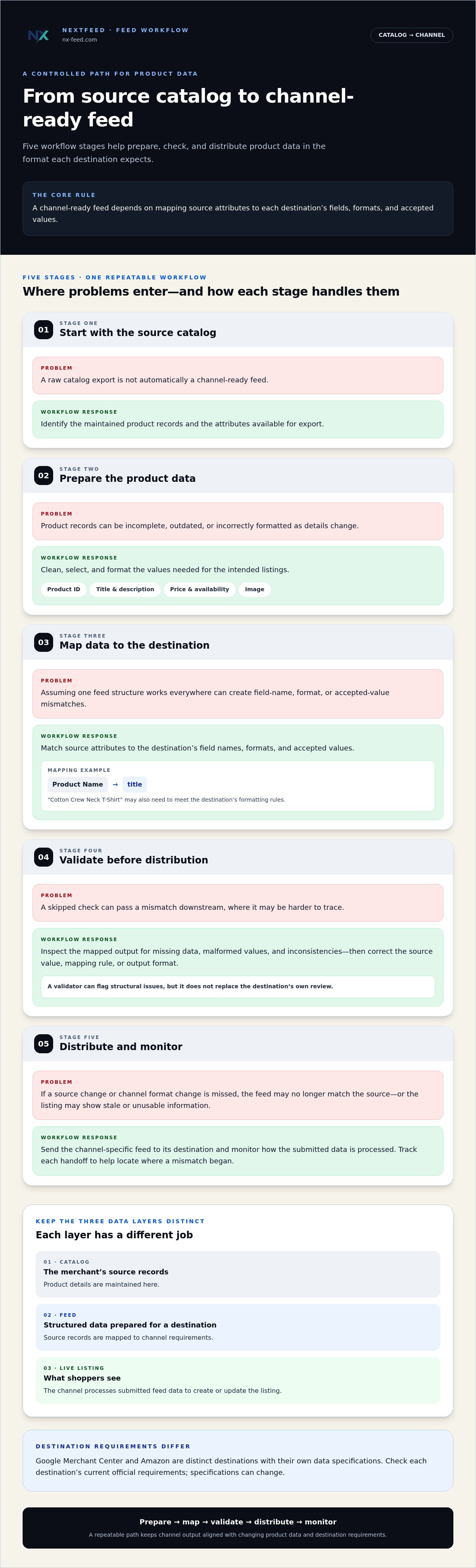
A channel-ready listing doesn’t come straight from a raw catalog export. Product feed management moves product records through a controlled sequence: select source data, prepare it, map it to a destination’s structure, validate the output, and distribute it. Each stage has a specific purpose. Skipping one can pass a mismatch downstream, where it may be harder to trace.
Channel-ready data depends on mapping source attributes to each destination’s fields, formats, and accepted values. Google Merchant Center and Amazon illustrate why. They are distinct destinations with their own data specifications, so a feed structure prepared for one shouldn’t be assumed to work for the other. Check each destination’s current official requirements when configuring a feed, since specifications can change.
From source records to channel-specific fields
The workflow starts with source records, then selects the attributes needed for a destination. A mapping defines how each source value appears in the output: a field may be renamed, reformatted, or matched to an accepted value. For example, a source catalog field called “Product Name” containing “Cotton Crew Neck T-Shirt” might map to a destination field called “title.” The value may also need to meet that destination’s formatting rules.
-
Source catalog: Identify the maintained product records and the attributes available for export.
-
Data preparation: Clean, select, and format the values needed for the intended listings.
-
Channel mapping: Match source attributes to each destination’s field names, formats, and accepted values.
-
Validation: Inspect the prepared output for missing data, formatting problems, and inconsistencies.
-
Distribution: Send the channel-specific feed to its destination and monitor how the submitted data is processed.
This sequence keeps the source record distinct from its channel-specific output. One source value can be transformed differently for separate destinations; no universal feed format automatically fits every channel. For a broader overview of the goals and challenges involved, Canto’s guide to product feed management offers useful context.
Where feed validation fits in the workflow
Validate after mapping and before distribution. This lets the team catch problems in the prepared feed while it can still correct the source value, mapping rule, or output format. A validator can flag structural issues such as missing fields or malformed values, but it doesn’t replace the destination’s own review. A channel may apply additional checks or make its own listing decision after submission.
Make validation a routine step, not just part of initial setup. Run it again when source attributes, mapping rules, or destination specifications change. NextFeed’s Free Feed Validator checks feeds for data errors and formatting issues before distribution. For teams managing preparation across multiple selling channels, the NextFeed Product Feed Management Platform helps organize and manage catalog feeds through that workflow.
Manual Feed Work or Centralized Product Feed Management?
There’s no universal point at which every retailer needs a dedicated platform. The practical question is whether the current process stays controlled as catalog changes and channel work accumulate. A spreadsheet can work when updates are occasional and destinations are limited. But when the same edits must be repeated across files, it can become harder to tell which version is current, who changed it, and whether every output was reviewed.
Operating need | Spreadsheet-led process | Centralized process
Effort: Edits and transformations may need to be repeated in separate files. | Shared workflows can organize recurring preparation tasks.
Consistency: Accuracy depends on people applying the same rules each time. | Common mappings and processes can help align channel outputs.
Visibility: File versions and handoffs may be difficult to follow. | Feed work can be managed from a more organized, shared view.
Repeatability: Steps can rely on individual knowledge and reminders. | A defined process can make recurring work easier to follow.
When can manual feed handling remain workable?
Manual handling may suit a limited catalog, few destinations, and infrequent changes, especially when one person can maintain the files and review each output. The workload is easier to manage when updates follow a predictable pattern. Watch for duplicated edits, uncertain file versions, and repeated checks. These are signs that the process is taking more attention, even if the catalog itself hasn’t grown.
When does centralized feed management become useful?
Complexity rises when product data needs repeated transformations for multiple destinations or when prices, availability, and attributes change often. A shared process can give teams a clearer way to organize mappings, updates, and reviews. It won’t guarantee error-free listings: source data and destination requirements still need attention. The decision is whether central coordination fits the work.
Assess the process, not just the catalog size. A modest catalog with frequent changes and several distinct outputs may require more oversight than a larger, stable catalog with a simple routine. Map where people copy data, apply formatting rules, check final files, and track changes. Then identify handoffs or repeated edits that could introduce errors or delays.
If those steps are visible and manageable, manual handling may remain a sensible choice. If teams struggle to keep versions aligned or repeat the same transformations reliably, centralized product feed management can help structure the work. Revisit the decision when destinations, update frequency, or ownership changes. The goal isn’t to adopt more tooling by default, but to keep the workflow maintainable as needs shift.
How to Build a Reliable Product Feed Management Workflow
A dependable product feed management workflow makes responsibility clear at every handoff. The source catalog needs an owner, channel transformations need documented rules, and someone needs to review the output after distribution. Set the process around how often catalog data changes and what each destination requires, rather than an arbitrary review interval.
Set ownership and change controls
Name who maintains core product attributes and who owns channel-specific transformations. Record each attribute’s definition, accepted values, and source of truth so the team knows which record to update when information conflicts. Keep a change log for meaningful catalog edits and mapping adjustments. When a listing changes unexpectedly, that history gives reviewers a practical place to start.
Run a repeatable workflow
Use these steps as a baseline, then assign a responsible role to each one. One person may cover several steps, but ownership should never be assumed.
-
Assign data ownership. Identify who maintains core attributes such as product titles, prices, and availability, and who resolves conflicts in the source records.
-
Document channel mappings. Record how source attributes are transformed for each destination, including field names, formats, accepted values, and rules that affect the output.
-
Validate before distribution. Check the prepared feed for formatting issues, missing or inconsistent data, and mismatches between catalog values and the intended output. Resolve issues before sending the feed.
-
Distribute and capture feedback. Send the prepared data to its destination, then record relevant processing messages or listing status. A valid feed file and an accepted or published listing are separate checkpoints.
-
Review changes and adjust. Revisit the workflow when catalog attributes, mappings, or destination requirements change. Set review timing according to the pace of those changes and the destination’s needs.
Validate, distribute, and review the output
Keep validation close to distribution so the team checks the current version, not an earlier draft. After submission, review destination feedback separately: a file can pass structural checks while the destination applies additional review or reports listing issues. NextFeed’s Free Feed Validator checks feeds for data errors and formatting issues before distribution, giving teams a practical first check.
Make the review cycle responsive to change. If product data or channel rules change often, review after relevant updates. If the catalog is stable, align checks with the team’s maintenance routine and destination requirements. Reassess the cadence when update patterns shift. Each change should have an owner, a check, and a traceable outcome.
Check your feed with the Free Feed Validator to inspect data and formatting issues before distribution.
How NextFeed Supports Product Feed Management
Once a feed workflow is defined, teams need a reliable way to organize and manage the work across destinations. The NextFeed Product Feed Management Platform helps merchants organize, optimize, and manage ecommerce catalog feeds across selling channels. It supports the preparation of channel-ready feed data as part of an ongoing process, rather than treating each export as a one-off file task.
The platform and the Free Feed Validator serve distinct roles. The platform supports ongoing feed preparation and management. The validator helps inspect a feed for data errors, formatting issues, and catalog inconsistencies before distribution. One helps structure recurring work; the other provides a practical check on feed health. Neither replaces clear ownership of source data or review of destination requirements.
When to use the NextFeed Product Feed Management Platform
Use a management platform when your team needs to organize feed preparation across multiple selling channels. Each destination can require its own handling, and repeated manual changes can make it difficult to keep the process consistent. NextFeed supports preparation across channels, helping merchants manage catalog feeds with each destination in mind. The aim is a structured workflow for maintaining product data for channel use, not a promise that every listing will be accepted or remain accurate without review.
A platform is relevant when feed work is ongoing: catalog information changes, channel outputs need attention, or responsibilities are spread across a team. It provides a more organized way to manage those feeds, while people remain responsible for maintaining source attributes, checking mappings, and responding to destination feedback. The tool supports operations; it doesn’t replace operational judgment.
Start with the Free Feed Validator
If you’re troubleshooting an existing feed, begin by checking it for issues. The Free Feed Validator helps identify data errors and formatting issues before distribution, making it a useful first step when a feed looks inconsistent or a file needs review. Use the results to locate problems in the data or structure, then correct the relevant source information or preparation rules and validate the revised output.
Validation is a checkpoint, not a substitute for destination review. A feed may be structurally sound and still receive further checks from the channel. Review destination feedback and published listing status after distribution, and revisit the process as product information or channel requirements change. This creates a clearer path from identifying an issue to correcting the right part of the workflow.
Start with a feed check, then decide whether your ongoing channel work calls for a dedicated management process. Explore NextFeed product feed management to see how the platform supports catalog feed preparation across selling channels.
Make Your Next Feed Update Easier to Control
Choose one recurring point of friction to address first: a field that’s often incomplete, a transformation repeated by hand, or a change that’s hard to trace. Define who owns that step and what should be checked before the next distribution. A small, visible improvement gives your team a clearer starting point for strengthening its product feed management process.
Then test the workflow against a current feed. The complimentary validator can help surface data errors and formatting issues before the feed moves forward. If preparing and maintaining feeds across selling channels calls for more structure, consider a platform designed to organize, optimize, and manage that ongoing work.
Take the next practical step with NextFeed product feed management. Start with a feed check, identify where your process needs attention, and build from there.
Frequently Asked Questions
Can one product feed be used for multiple sales channels?
One source dataset can support multiple sales channels, but a single unchanged feed may not meet every destination’s requirements. For example, a retailer might maintain one set of product attributes, then create separate outputs with each channel’s required fields and value formats. Product feed management helps structure that reuse without assuming every destination accepts identical data. Check each channel’s specifications before distributing its feed.
What file formats are commonly used for product feeds?
CSV, TSV, and XML are common product feed formats. The right format depends on the receiving channel and how the feed is submitted. A spreadsheet export might suit one workflow, while another destination expects a structured XML file. Don’t choose a format only because it’s easiest to export. Review the channel’s current documentation, then check that the generated file uses the expected structure, encoding, and field values.
How often should an ecommerce product feed be updated?
Update a feed when the underlying information changes or the destination’s requirements call for a new submission. A product with frequently changing availability may need closer synchronization than a stable item with unchanged details. Set the review cadence around how often prices, stock, or product attributes change, and account for the destination’s processing needs. After a major catalog update, verify that submitted values match the source records.
Is a GTIN required for every product listing?
No, a GTIN isn’t universally required for every product listing. Whether it’s needed depends on the destination’s rules and the product’s circumstances. Use the identifier assigned to the product; don’t create or guess a GTIN to fill an empty field. Check the relevant channel’s current product identifier guidance, including any rules for products that don’t have a GTIN, before submitting the listing.
What is the difference between a product feed and a product catalog?
A catalog is the merchant’s maintained product information; a feed is data prepared for submission to a destination. For instance, a catalog may hold internal notes or attributes a sales channel doesn’t use, while the feed includes only the fields needed for that submission. Keeping those roles distinct helps teams avoid treating a channel-specific adjustment as a change to the underlying product record.
Can a valid feed still have products rejected by a channel?
Yes. A file can be correctly structured and still contain a product that a channel doesn’t accept or publish. The destination may assess product-specific requirements, listing policies, or submitted values beyond basic file checks. Treat validation and channel decisions as separate signals: a validator can surface data or formatting problems, while destination feedback can help explain a product-level issue. Review the affected item and the channel’s current guidance.