Product Feed Software: Selection Guide for Retailers
The platform with the longest channel list may still be the wrong fit. Product feed software for retailers should solve an operational problem: keeping product data aligned with each external channel’s requirements without turning every listing update into manual rework. A feature grid can’t tell you whether a tool fits your catalog, team, and publishing rhythm.
If you manage multiple channel-specific formats, correct the same catalog inconsistencies by hand, or struggle to separate essential capabilities from attractive extras, compare tools against your daily operations. The right choice depends on catalog complexity, how feed work gets handled, and where errors need to be caught, not channel count alone.
This guide explains how to assess those needs, compare platforms using consistent criteria, and plan an evaluation. NextFeed helps retailers organize, optimize, and manage catalog feeds across selling channels. Its Free Feed Validator identifies data errors, formatting issues, and catalog inconsistencies before distribution. Start with workflow fit, then assess the features that can help keep listings consistent.
Key Takeaways
-
Separate your product catalog, channel feed, and live listing to pinpoint where data work and inconsistencies arise.
-
Assess product feed software for retailers by workflow fit, catalog control, validation, channel needs, and ease of administration, not feature count alone.
-
Compare dedicated software with manual processes and existing ecommerce-platform tools using the same operational criteria.
-
Map your current workflow, define requirements, test representative data, and review fit before adopting a platform.
-
Use NextFeed to organize, optimize, and manage catalog feeds across selling channels, and its Free Feed Validator to inspect data and formatting issues before distribution.
Table of Contents
-
Which product feed software capabilities should retailers prioritize?
-
How should retailers prepare to evaluate and adopt feed software?
When does a retailer need product feed software?
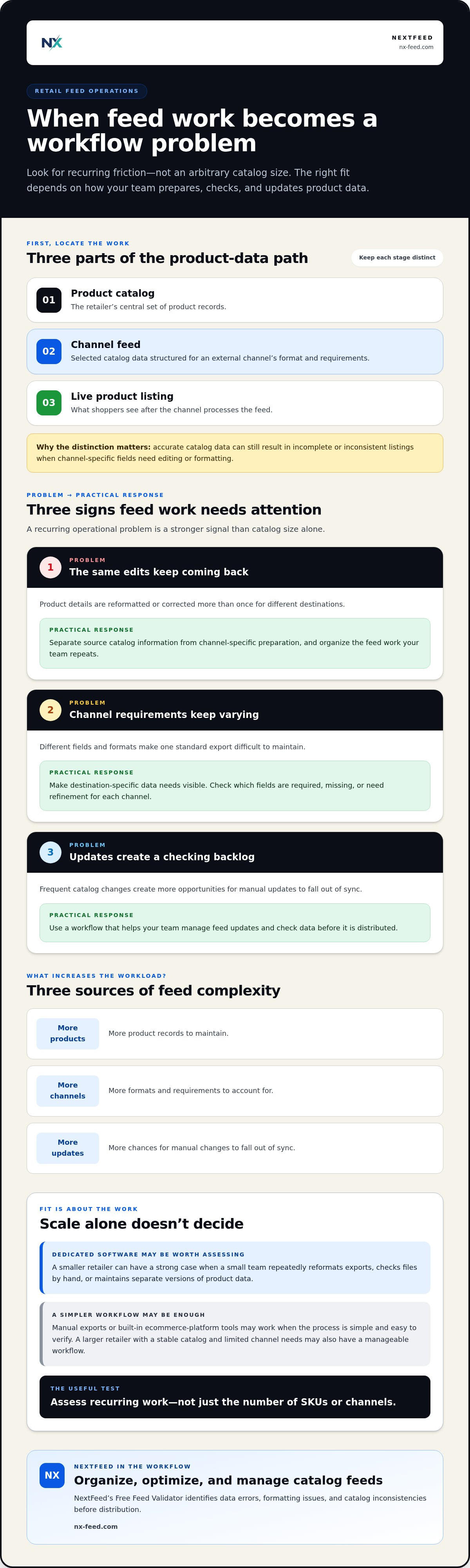
A product catalog is the retailer’s central set of product records. A channel feed is a structured version of selected catalog data, prepared for an external sales channel’s format and requirements. A live product listing is what shoppers see after that channel processes the feed. These distinctions matter: accurate catalog data can still produce incomplete or inconsistent listings when channel-specific fields need editing or formatting.
Product feed software for retailers helps prepare and manage catalog data for external channels. The workload typically grows with the number of products, destinations, and updates. More products mean more records to maintain; more channels mean more formats and requirements; frequent changes create more opportunities for manual updates to fall out of sync.
What does product feed software do for a retail catalog?
Feed management focuses on preparing product information for distribution. It differs from inventory management, which tracks stock, and order management, which handles purchases and fulfilment. A feed system works with catalog attributes such as titles, descriptions, identifiers, images, and prices, then organizes that information to meet each channel’s requirements. For a general introduction to the concept, see What is a Product Feed?
For example, a catalog record for a ceramic mug might contain its name, colour, material, price, image, and stock status. One channel may require a particular title structure or product category; another may use different field names or accept a different format. Feed preparation maps the relevant data into channel-ready records. It doesn’t replace the source catalog or the listing displayed by the channel.
Which retailers are most likely to benefit?
Retailers using multiple selling channels often face repeated editing, mapping, and checking. A product field that works in one destination may need adjustment for another. When products, prices, or availability change frequently, each manual export creates another handoff where an update can be missed or entered inconsistently.
Scale alone isn’t the deciding factor. A smaller retailer can have a strong case for dedicated software if a small team repeatedly reformats exports, checks files by hand, or maintains separate versions of product data. A larger retailer with a stable catalog and limited channel needs may have a more manageable workflow. Assess recurring work, not just the number of SKUs.
Manual exports or built-in ecommerce-platform tools may be enough when the process is simple and easy to verify. Look for practical signs of friction: staff repeat the same edits for each destination, channel changes trigger extensive rework, or it’s difficult to identify where a data issue entered the process. These are signs that feed management has become a distinct operational task.
-
Repeated work: The same product details are reformatted or corrected more than once.
-
Growing variation: Channel-specific fields make one standard export difficult to maintain.
-
Update pressure: Frequent catalog changes create a backlog of feed checks and revisions.
When these patterns are routine, a dedicated platform such as NextFeed can provide a place to organize, optimize, and manage catalog feeds across selling channels. Evaluate it when the current workflow is difficult to control, not when the catalog reaches an arbitrary size.
Which product feed software capabilities should retailers prioritize?
Start with the work your team needs to control, not the feature list that looks longest. Product feed software for retailers should make catalog data easier to organize, refine, prepare for channel requirements, and check before distribution. A capability matters when it solves a recurring workflow problem or helps prevent inconsistent product information from reaching a sales channel.
How should retailers assess feed editing and optimization?
Look for a clear way to manage product attributes and prepare them for different listings. A retailer might need to refine titles, descriptions, or categories for a channel while preserving accurate source information. The process should be clear to the people responsible for catalog updates, so they can review what changed and why before data is distributed.
Define optimization by your own goals, such as making product information more complete or aligning it with channel requirements. Advanced editing features don’t replace reliable catalog control. Prioritize a workflow your team can operate consistently, with edits that support the retailer’s requirements rather than promises of improved performance.
Can the platform prepare data for each channel?
Different destinations may require different fields, formats, or product details. Assess whether the software makes those differences visible and gives your team a coherent way to prepare relevant catalog data for each destination. For example, a channel may require a product category or identifier that isn’t used in the same way elsewhere. Clear preparation helps prevent a one-size-fits-all export from obscuring those needs.
Keep the comparison practical. Can staff tell which data is intended for each channel? Can they see where a required field is missing or needs refinement? These questions reveal more about operational fit than a raw channel count.
Why do validation and feed health matter?
A feed can appear complete in the catalog but contain formatting issues or inconsistencies when prepared for distribution. Those problems can interfere with processing or produce unreliable channel data. Validation is a preventative check that helps identify potential issues before a feed is sent. The retailer still needs to review and correct the underlying product information.
Separate detection from editing. A validation step should help teams see data errors and format issues, not imply that every finding is automatically corrected. NextFeed’s Free Feed Validator identifies data errors, formatting issues, and catalog inconsistencies before distribution, giving retailers a practical way to inspect feed health.
Prioritize core capabilities first: catalog organization, controlled editing, channel-specific preparation, and validation. Then assess optional features against actual tasks. If a feature doesn’t address a defined workflow need, it shouldn’t outweigh a clear, manageable process. Retailers looking for a dedicated system to organize, optimize, and manage catalog feeds across selling channels can explore NextFeed’s product feed management platform.
How can retailers compare feed software options fairly?
Compare the work each option can handle, not the number of features on its sales page. A consistent scorecard shows whether a tool addresses your catalog tasks, channel requirements, and data checks. Include your current manual process and ecommerce-platform functionality alongside dedicated feed software. A new platform should earn its place by improving workflow fit, not simply by being purpose-built.
What should go into a retailer’s software scorecard?
Before evaluating options, record the tasks your team performs, the channels it supports, who owns product data, and where that data comes from. Mark each requirement essential, useful, or unnecessary. Then assess every option against the same requirements and representative products. This keeps the comparison grounded in your operation rather than feature labels or vendor claims.
| Criterion | What to assess | Evidence to record |
|---|---|---|
| Workflow fit | Can the option support the steps your team actually performs? | Tasks completed, handoffs, and repeated manual edits |
| Catalog control | Can the right product information be organized and reviewed? | How representative records are handled and changed |
| Validation | Can the team identify data or formatting issues before distribution? | Issues surfaced in the test data and how clearly they’re shown |
| Channel needs | Can the option prepare data for your required destinations? | Fields and format requirements covered in the evaluation |
| Administration | Can responsible staff understand and maintain the process? | Steps, ownership, and effort required for routine work |
Use the same sample across each option: a standard product, one with missing or unusual attributes, and a product that changes often. Include requirements that matter to your channels. Note what the tool handles, what still needs manual work, and whether staff can interpret the results. Score observed evidence, not whether a feature is advertised.
How do dedicated feed tools differ from built-in ecommerce features?
Built-in commerce features may cover the feed tasks a retailer needs, especially when the catalog and channel workflow are straightforward. Dedicated feed software focuses on organizing, optimizing, and managing catalog feeds across selling channels. Neither category is automatically superior. The practical test is whether your existing setup handles the required workload clearly and consistently, with manageable oversight.
Keep vendor claims and case studies in context. They can explain intended use, but another retailer’s results don’t establish what your operation will achieve. Compare workflow fit, catalog control, validation, channel needs, and administration using the same sample data and requirements. If your current tools meet those needs without recurring friction, additional software may not be necessary. If gaps persist, the scorecard shows where a dedicated option could help.
How should retailers prepare to evaluate and adopt feed software?
A useful evaluation starts before a platform trial. Map how product data moves through your operation, agree on what needs to improve, and test representative records against those needs. This ties the decision to real work and makes adoption easier to plan.
What should retailers map before starting an evaluation?
Trace each key product field to its source and owner. Note who maintains titles, descriptions, identifiers, images, prices, and availability, then record where feed data goes and which steps are manual. Separate confirmed channel requirements from assumptions that need internal agreement. This map exposes handoffs and recurring changes that a software demo alone may not reveal.
Use the findings to define a focused evaluation: choose the destinations and catalog tasks you need to assess, identify who will participate, and set a review period that fits your team. Product feed software for retailers is easier to judge when requirements are settled first, rather than added informally as new features appear.
How can a retailer test operational fit?
Choose records that reflect normal work as well as exceptions. Include a common product, a variation such as a different size or colour, and an edge case with incomplete or unusual data. Ask the people who manage the catalog to follow the proposed workflow. Note where they need clarification, repeat steps, or rely on manual work.
Follow a four-step evaluation:
-
Map the workflow. Document catalog sources, data owners, destinations, recurring edits, and existing checks.
-
Define requirements. Mark tasks as essential, useful, or out of scope, and agree on what success should look like for your operation.
-
Test representative data. Use the same selected records and channel needs for each option, noting what the workflow supports and where gaps remain.
-
Review fit. Compare findings with your requirements, including staff understanding, data accuracy, and administrative effort.
Keep the review evidence-based. Did the team understand the process? Were errors and formatting issues visible? Could staff identify the next action without losing track of the underlying catalog data? Record observations instead of setting arbitrary pass marks. The right measures depend on your workflow, but should reflect clear ownership, reliable data handling, and manageable day-to-day administration.
Validation adds a practical check before distribution. NextFeed’s Free Feed Validator identifies data errors, formatting issues, and catalog inconsistencies, helping retailers inspect feed health as part of an evaluation. Use NextFeed’s Free Feed Validator to check feed data against your catalog workflow.
How does NextFeed support retailers managing product feeds?
Once you’ve mapped the workflow and defined requirements, assess how a platform fits those tasks. NextFeed provides a product feed management platform for ecommerce retailers to organize, optimize, and manage catalog feeds across selling channels. It focuses on the product data retailers prepare for external destinations, rather than promising a particular sales or performance result.
Where does the NextFeed platform fit in a retailer’s workflow?
NextFeed is designed for retailers who need to manage catalog feeds for multiple selling channels. It is relevant when product data needs to be organized and refined for distribution as part of a repeatable workflow. Compare the platform’s purpose with the requirements you’ve identified: which catalog information needs attention, which destinations your team serves, and how feed work fits into existing responsibilities.
The practical question is fit. Does a dedicated place to organize, optimize, and manage feeds align with the work your team needs to handle? Use your requirements and representative records to assess that, rather than assuming a platform is suitable simply because it supports the general category of work.
When should a retailer use the Free Feed Validator?
The Free Feed Validator is a complimentary tool for inspecting feed data before distribution. It helps identify data errors, formatting issues, and catalog inconsistencies. Use it to check feed health, then review findings against your source catalog and channel requirements. Validation surfaces potential issues; it is distinct from ongoing platform management and doesn’t determine what changes a retailer should make.
The two offerings serve related but distinct purposes. The platform supports ongoing catalog feed organization, optimization, and management across selling channels. The validator helps inspect data and formatting issues before a feed is distributed. Consider each against the operational need: managing feeds as part of a continuing process, checking a feed for potential issues, or both.
To make an evaluation concrete, start with your workflow map and essential requirements. Consider whether NextFeed’s platform matches the recurring work your team needs to manage. Separately, use the validator to examine feed data and review identified issues. Base the decision on what your staff needs to do and what the evaluation shows, not on assumed outcomes.
If the platform’s scope aligns with your channel workflow, explore NextFeed and check your product feed. Review feed data with the Free Feed Validator, and use the findings to guide your product feed software evaluation.
Put your product data workflow to the test
The next step isn’t to add more features to your shortlist. Turn the evaluation into a working decision: identify who owns product data, agree on how feed quality will be reviewed, and choose a workflow your team can maintain as catalog needs change. This gives you a practical basis for adopting product feed software for retailers without adding unnecessary administrative steps.
NextFeed brings catalog feed organization, optimization, and management together for multiple selling channels. Its Free Feed Validator helps you inspect a feed for data errors, formatting issues, and catalog inconsistencies before distribution. Use both as part of your evaluation, with your catalog needs and team workflow as the measure of fit.
Explore NextFeed and check your product feed to assess how its platform and Free Feed Validator fit your retail workflow.
Frequently Asked Questions
Is product feed software only useful for large retailers?
No. Fit depends on catalog complexity, channel requirements, and recurring manual work, not company size alone. A small retailer selling a few product lines across several destinations may spend time reshaping the same data for each feed. That workload can justify evaluating dedicated software. A retailer with a straightforward catalog, limited channel needs, and a manageable update process may not need a separate platform yet.
Does product feed software replace an ecommerce platform?
No, they typically serve different roles. An ecommerce platform supports the online store, while feed software focuses on preparing and managing catalog data for external selling channels. Some ecommerce platforms include feed functions, so compare those capabilities with your actual channel and catalog workload before adding another system. If built-in tools cover your needs and remain manageable, additional software may not be necessary.
How long does it take to implement product feed software?
There’s no single implementation timeline. It depends on catalog condition, data sources, channel requirements, and who owns the work internally. Before evaluating a platform, map how product information is maintained and select representative products, including records with variations or incomplete fields. This focuses the assessment and can reveal preparation work early. Treat implementation planning as specific to your operation, not as a standard duration.
Can product feed software work with an existing product catalog?
Assess this using your actual data and the software’s capabilities. Identify where product information lives, who maintains it, and which fields need to be prepared for external channels. Then test representative records against those requirements. Include a standard item and one with variations or less complete information to see whether the proposed workflow fits before deciding.
How much does product feed software cost?
Subscription pricing varies by provider and plan, so compare the proposed scope with the work your retailer needs to manage. First document required catalog workflows, selling destinations, and administrative responsibilities. Then assess whether each plan covers those needs without paying for capabilities outside your intended use. Review the full plan terms, and avoid comparing headline prices alone when the included scope may differ.
Is product feed software the same as a product information management system?
No, their typical focus differs. Feed software prepares and manages product data for external channel feeds, while a product information management system, or PIM, generally organizes product information for broader business uses. Boundaries vary by provider, and some capabilities may overlap. Compare what each system does against your data ownership model, catalog processes, and channel workflows rather than relying on category names alone.